Buyer readiness
Automatic ad placement should follow the reader, not interrupt the job.
Organization byline: Measurement Press editorial desk. This page does not list an individual author or reviewer. Read the editorial method and corrections policy.
About 10 min read
Automatic ad placement can work well on a serious publication when the page gives the system a clean structure: clear landmarks, enough editorial depth, stable spacing, and obvious zones where paid units do not belong.
Use this checklist before opening automatic placements on a new template, long guide, topic desk, or reference page. The goal is not to maximize the number of paid interruptions. The goal is to keep the article useful enough that advertising can earn attention without weakening trust.
Picture a reader landing from search while trying to finish a specific job: decide whether a page, placement, or report is ready. If the first screen feels like a maze of boxes, or a table is split from the explanation that makes it useful, the page may still load correctly but fail the trust test. The right review starts with the reader's path, then asks where advertising can fit without changing that path.
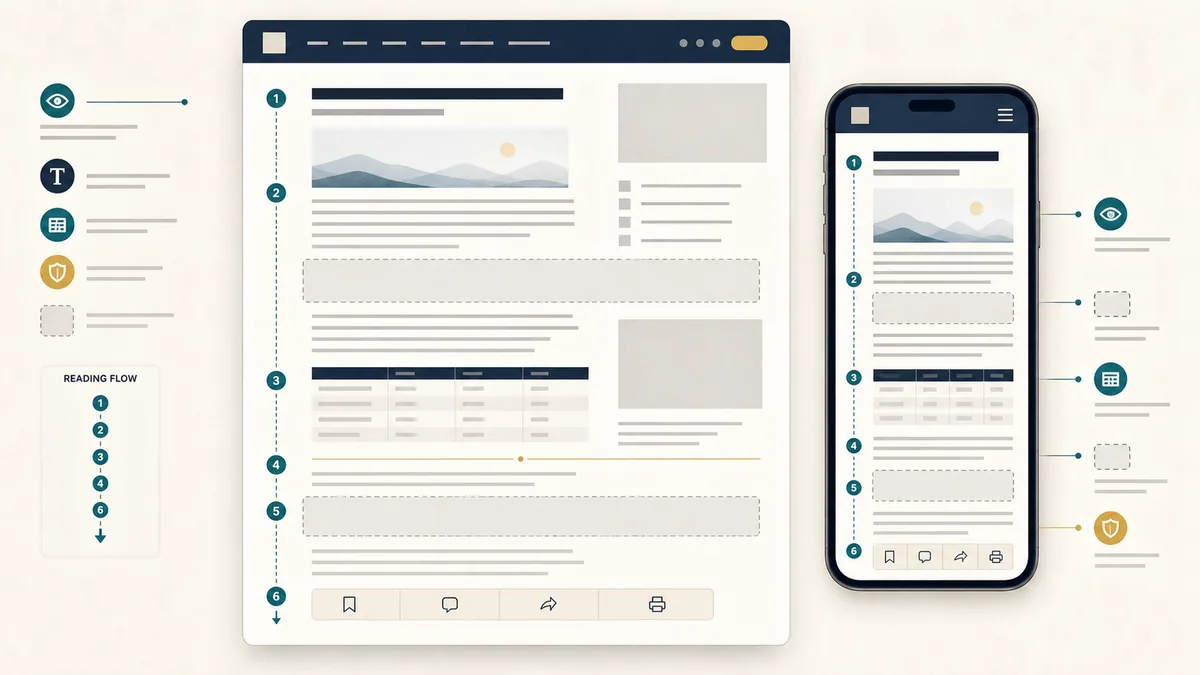
Reading-flow fit test
Start with the reader's job before reviewing any placement. A page that helps someone choose a measurement method, audit a public claim, or prepare campaign evidence needs enough uninterrupted context for the first decision to make sense.
| Page condition | Ready signal | Hold or revise when |
|---|---|---|
| Opening context | The headline, lede, update note, and first explanation are visible before any paid unit competes for attention. | The first screen becomes a stack of navigation, labels, or paid boxes before the article's job is clear. |
| Editorial depth | The article has multiple useful sections, tables, examples, or workflow steps before lower-page monetization is considered. | The page is thin, mostly link lists, or too short to support automatic breaks without crowding. |
| Landmarks | Header, main content, article body, aside, footer, breadcrumbs, and tables have predictable semantic boundaries. | Important controls, forms, tables, or navigation look like ordinary body content to a placement system. |
| Internal path | The page gives readers a next guide, source page, or workflow route after the central explanation. | The page ends abruptly after a paid module or leaves no useful next step for the reader. |
Zones to protect
Automatic placement is safer when the site makes protected zones obvious. A paid unit should not split a control, distort a data table, or make a reader question whether editorial navigation is advertising.
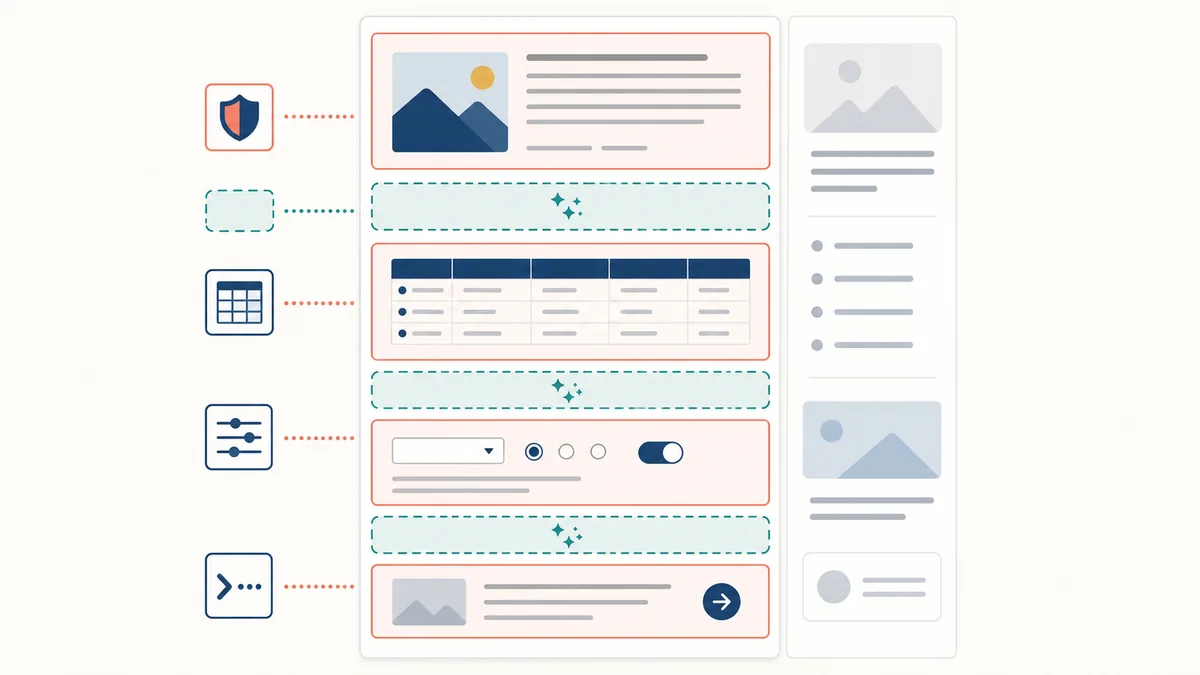
Keep out of navigation and controls
Menus, search panels, worksheet forms, calculator inputs, filters, buttons, and breadcrumbs should stay free of paid modules. These areas exist to help the reader act.
Keep tables readable
Decision tables, scorecards, export samples, and field dictionaries should not be interrupted row by row. Place paid units before or after the table group instead.
Keep labels attached
Each paid module needs one clear label that stays with the unit after responsive wrapping. Avoid repeated labels that make the page look cluttered or ambiguous.
Keep sidebars secondary
Rails can carry supporting links and display inventory on desktop, but the article body should remain complete without relying on the rail.
Layout stability checks
Automatic placements should never turn a stable article into a moving target. Reserve predictable space for planned slots, suppress placements that do not fit a viewport, and verify that content does not jump after the reader begins reading.
| Check | What to inspect | Evidence to keep |
|---|---|---|
| Reserved space | Inline, leaderboard, rail, and post-content regions have stable minimum dimensions before creative work runs. | Slot ID, format, expected size family, breakpoint behavior, and exception notes. |
| Mobile adaptation | Rail units and wide creative paths either move below the article or disappear cleanly on narrow screens instead of leaving empty boxes. | Viewport screenshots or QA notes for mobile, tablet, and desktop widths. |
| Late load behavior | Lazy loading waits for lower placements without shifting headings, tables, or next-guide cards. | Observed shift notes and the section where the unit becomes eligible. |
| Fallback state | When demand is unavailable, the page still reads cleanly and does not show broken frames or repeated blank labels. | Fallback mode, placeholder handling, and whether the article remains complete. |
Automatic-placement preflight
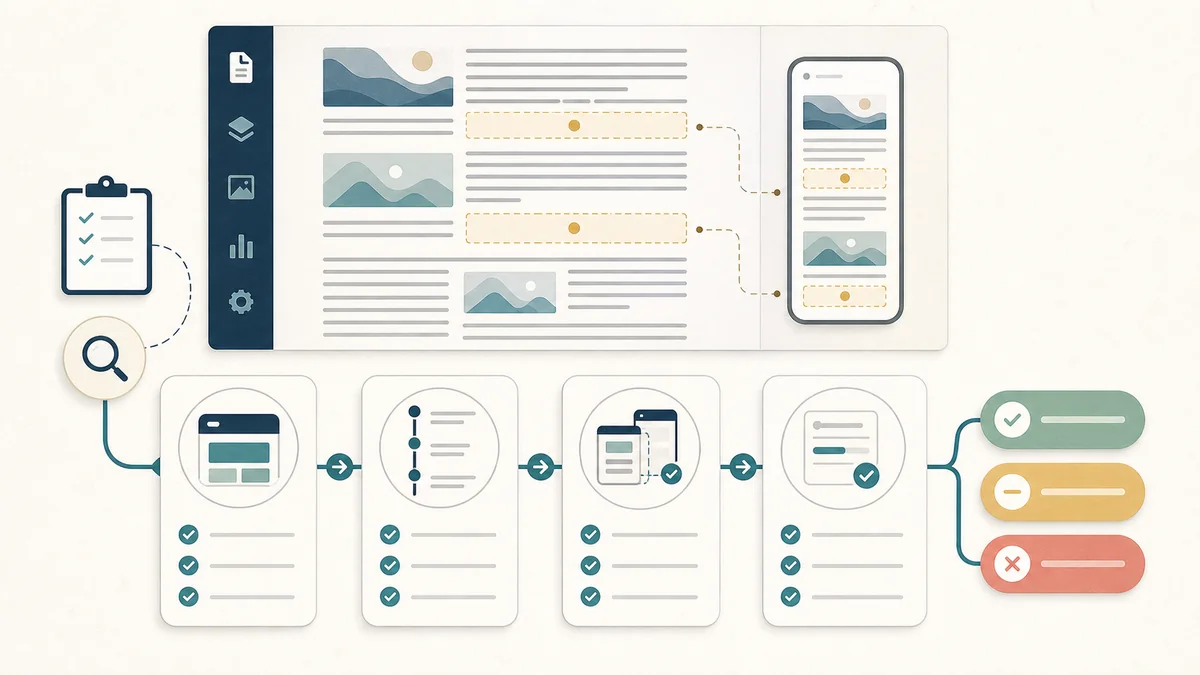
1. Identify the reader job.Name the decision the page supports: source review, method choice, campaign readout QA, buyer readiness, or inventory readiness. If the job is unclear, fix the page before adding more demand.
2. Mark the natural breaks.List the section breaks where a paid module could appear without separating a claim from its evidence, a table from its note, or a worksheet question from its answer.
3. Check the first screen on mobile.The smallest viewport should still show the page identity and editorial purpose quickly. If the first paid unit arrives before the article has established value, move or suppress that unit.
4. Preserve crawlable next steps.Automatic placement works best on pages with real content depth and internal pathways. Keep next-guide cards, source links, and related desks available after the main explanation.
5. Record the final boundary.Before launch, write down which zones are eligible, which zones are protected, which breakpoints suppress units, and which report fields will show where delivery occurred.
Content density and internal paths
A page with more text is not automatically better. The page needs durable, inspectable material that helps the reader finish the task. Useful density comes from explanations, decision tables, examples, checklists, source trails, and related guide paths.
| Page element | Reader value | Placement implication |
|---|---|---|
| Decision table | Shows how to choose between routes, evidence levels, or next actions. | Keep table groups intact; place paid units around them. |
| Checklist steps | Lets the reader perform the review, not just read about it. | Use natural breaks between step groups, not inside individual steps. |
| Source or method links | Helps readers verify definitions, standards, and claim boundaries. | Protect link lists from paid modules that could be mistaken for navigation. |
| Next-guide cards | Keeps discovery useful after the central answer is complete. | Keep paid units from replacing the reader's next editorial path. |
Readout fields
Automatic placement decisions should still be reportable. If a campaign later performs differently on one page type, the report should be able to separate page context, placement family, device class, and whether the unit appeared in the article body, rail, or after-content region.
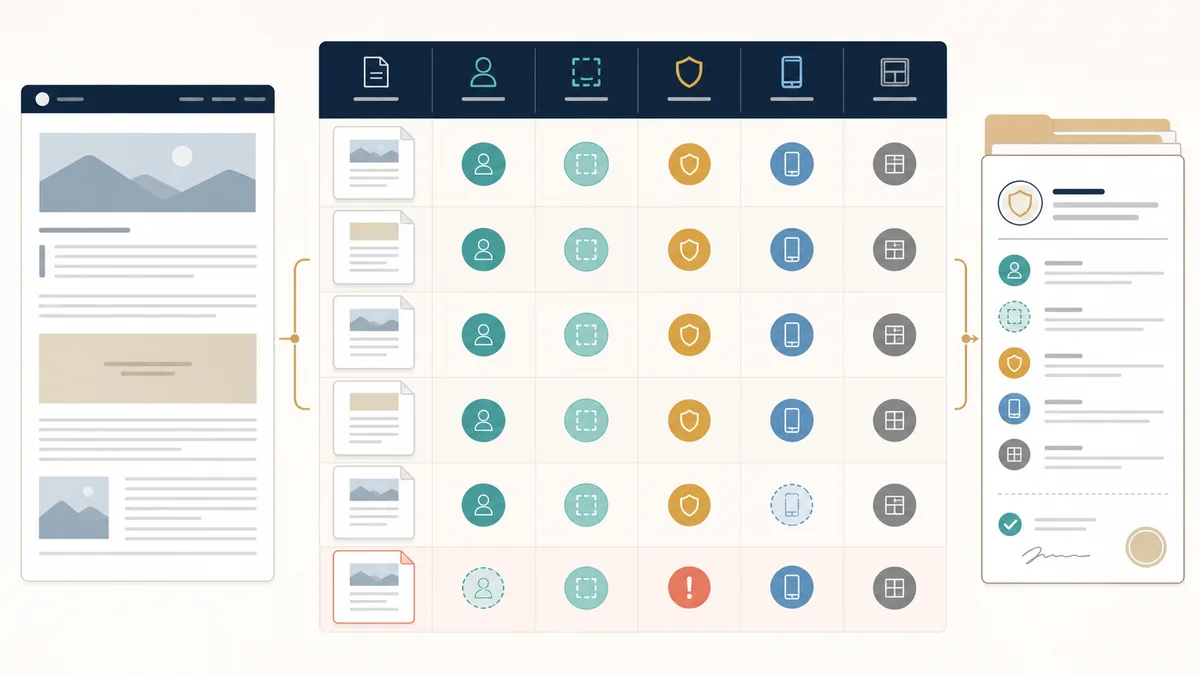
| Field | Minimum record | Why it matters |
|---|---|---|
| page_job | Source review, method choice, campaign readout, buyer readiness, inventory readiness, or case-study learning. | Prevents unlike reader tasks from being averaged into one response story. |
| eligible_zone | Opening suppressed, upper body, lower body, rail, post-content, or native card. | Shows where automatic placement was allowed to appear. |
| protected_zone | Navigation, table, form, search, calculator, worksheet, or next-guide area. | Explains why some page regions did not carry paid modules. |
| device_class | Mobile, tablet, desktop, or unknown. | Keeps rail and inline behavior from being compared without context. |
| layout_state | Stable, constrained, suppressed, exception, or needs repair. | Connects delivery results to the reader-experience QA record. |
Decision bands
| Status | Use when | Next action |
|---|---|---|
| Ready | The page has clear landmarks, enough editorial depth, stable eligible zones, and protected controls. | Allow automatic placement within the recorded zones and preserve reporting fields. |
| Ready with constraint | The page is useful, but one viewport, table group, or creative family needs a boundary. | Suppress or constrain the weak area before launch. |
| Hold for structure | The page lacks clear section breaks, next steps, or protected zone boundaries. | Improve the article structure before allowing automatic placement. |
| Hold for trust | Paid units crowd the opening explanation, resemble navigation, split controls, or weaken source review. | Remove or relocate the eligible zone and rerun mobile and desktop QA. |
Primary source trail and a simulated preflight gate
Google's Auto ads overview says the system reads page structure, content amount, and existing ads when looking for placements. Its setup guidance also documents excluded areas and page exclusions, so a publisher can define boundaries instead of treating every page region as available inventory.
For the stability part of this review, Google's Core Web Vitals guidance identifies Cumulative Layout Shift (CLS) as the visual-stability metric and recommends a good threshold below 0.1. The CLS optimization guide explains why late-loading ads and other dynamic content need space reserved in the initial layout.
What the sources support—and what they do not
| Source boundary | Supports in this checklist | Still requires local evidence |
|---|---|---|
| Auto ads guidance | Page structure, content amount, existing-ad context, excluded areas, and page exclusions are legitimate placement controls. | Which sections on a particular template are safe, useful, or available for delivery. |
| Core Web Vitals guidance | CLS is the visual-stability measure and a good target is below 0.1. | The actual field or lab CLS of this page, template, device mix, or ad configuration. |
| CLS optimization guidance | Ads and other dynamically injected content can shift a page when dimensions are not reserved. | Whether a chosen slot reserves enough space and remains stable across the tested breakpoints. |
| Measurement Press worksheet | The named reader job, protected zones, eligible breaks, and six-gate decision structure. | Any impression, click, revenue, delivery, or causal performance conclusion. |
| Simulated gate | Worksheet evidence | Result |
|---|---|---|
| Reader job is named | The page supports a preflight decision for a new template, guide, topic desk, or reference page. | Pass |
| Opening context is protected | The opening explanation and first decision are marked ineligible before any lower-body break is considered. | Pass |
| Tables and controls stay intact | The decision table is protected; the form/control group is held until the narrow-viewport check is recorded. | Hold |
| Eligible breaks are documented | Two lower-body breaks are identified after the protected opening, table, and controls. | Pass |
| Space and fallback are recorded | The format boundary is named, but no observed browser run or fallback capture is supplied in this worksheet. | Hold |
| Readout context is preserved | page_job, eligible_zone, protected_zone, device_class, and layout_state are defined. | Pass |
Simulated worked example - not a live delivery audit.Score: four passing gates out of six = 4 / 6 = 66.7%. The two hold gates control the decision: allow only the documented lower-body breaks after a real desktop/mobile browser check supplies reserved-space and fallback evidence; do not treat the score as an impression, click, revenue, or CLS result.
Assumptions and limit: the zones and gate outcomes above are a fictional worksheet, not an observation of Measurement Press traffic or a named client's page. Re-run the worksheet with the actual template, viewport captures, placement settings, and post-load stability evidence. If the controls shift, the opening becomes crowded, or the report cannot separate device and zone, use Hold for trust until the page is repaired.
Pair with
Use this checklist with the ad experience and page-speed budget checklist for load and stability budgets, the programmatic inventory QA checklist for slot contracts, the inventory readiness matrix for placement IDs and size rules, the private marketplace reporting field dictionary for readout fields, and the publication migration readiness checklist before routes, templates, or ad paths change.
Takeaway
Automatic ad placement is safest on pages that already make the reader's job clear. Build strong article structure first, protect the zones where readers act, and let monetization follow the shape of useful content.
Open the broader reading-flow route.
Use these routes when automatic placement work needs inventory proof, performance budgets, or buyer-ready reporting fields.
Inventory deskProtect launch qualityMove from reading flow into placement contracts, seller evidence, launch QA, and reporting keys.
Experience budgetCheck speed and stabilityReview script weight, layout stability, lazy loading, refresh boundaries, and mobile behavior.
Inventory laneSearch launch-readiness guidesFind the related placement, page-flow, seller-path, and reporting checks.