Campaign launch operations
Creative asset acceptance checklist
Organization byline: Measurement Press editorial desk. This page does not list an individual author or reviewer. Read the editorial method and corrections policy.
About 12 min read
Creative acceptance is not only a file-format check. A launch-ready ad needs usable assets, clear disclosure, context fit, stable destinations, and tracking fields that let the final report separate creative response from placement, page, and audience effects.
Picture a Friday afternoon launch review. The buyer has sent three banner sizes, a native headline, a click URL, and a promise that the campaign will "prove demand." Ad operations wants to traffic the files, the sales lead wants to keep the flight date, and the analyst knows a broken destination or missing creative ID will make the final readout almost useless. Creative acceptance is the point where that pressure gets translated into a clean record.
Use this checklist before display, native, sponsorship, newsletter, or private marketplace creative is approved for trafficking. The goal is to make the handoff specific enough for ad operations while keeping the campaign useful to readers and readable in the eventual report.

Acceptance packet
The acceptance packet should let a publisher, buyer, agency, and analyst identify the same asset without relying on screenshots or email thread memory.
| Packet item | Accept when it includes | Hold if missing |
|---|---|---|
| Campaign record | Campaign name, buyer name, package ID or deal key, flight dates, primary contact, and approval owner. | The asset cannot be tied to proposal, trafficking, invoice, or report records. |
| Placement scope | Eligible placement IDs, device classes, page groups, excluded contexts, and whether native is included. | The campaign may run outside the intended reader job or device fit. |
| Creative IDs | Unique ID for each message, size, format, offer, destination, and version. | Results will pool assets that should be read separately. |
| Asset files | Final file names, dimensions, file type, weight, animation status, backup image, alt text where needed, and click URL. | Trafficking has to infer which file is final or which size can serve. |
| Native fields | Brand name, headline, body copy, image, destination, disclosure text, and fallback display unit. | The unit may look like editorial content or lack enough information to render consistently. |
| Destination record | Final landing URL, page version, form path, destination action, UTM values, and fallback mobile URL if different. | Creative response can be confused with page friction or broken routing. |
| Measurement note | Primary signal, comparison rule, source-trail fields, and downstream quality fields the buyer can share. | The campaign can launch, but the readout should stay descriptive and narrow. |
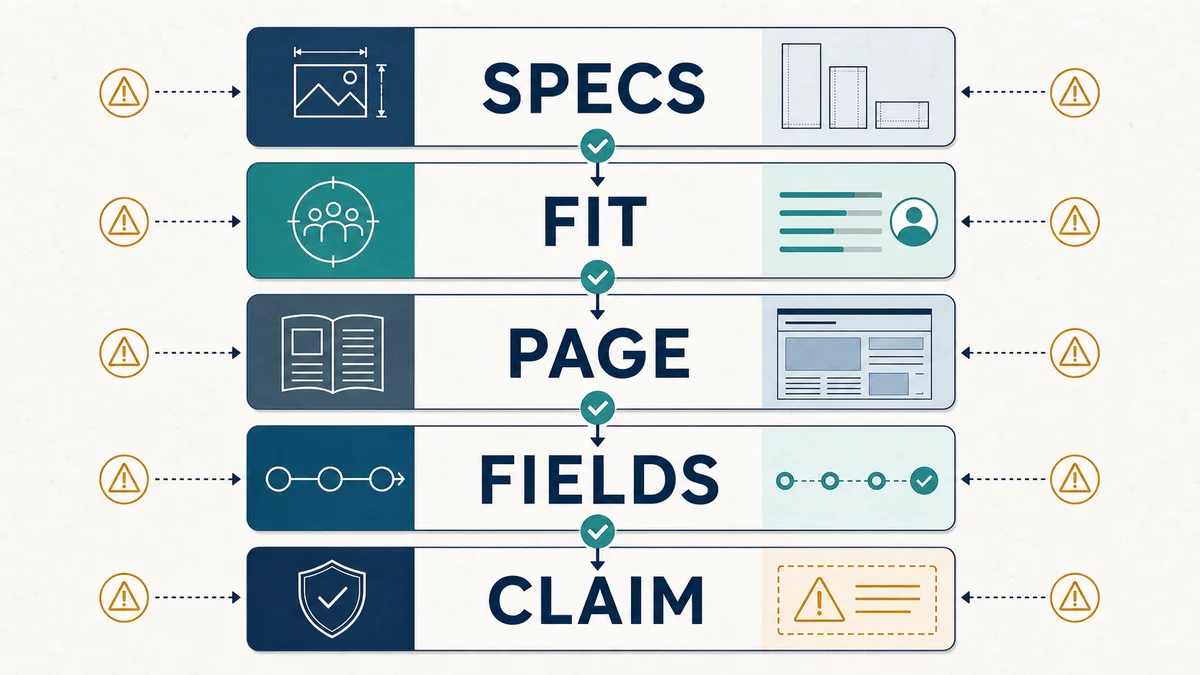
Display asset checks
1. Match the accepted size set.Confirm every supplied display file matches an eligible placement size from the media kit. Do not stretch, crop, or traffic near-match dimensions as if they were approved sizes.
2. Preserve a backup creative.Animated, rich, or HTML5 assets should include a static fallback that can carry the message when a device, browser, or supply path cannot render the primary file.
3. Keep the message legible.Primary text, brand name, offer, and call to action should remain readable at the smallest eligible mobile size without relying on hover states or fine print.
4. Version each change.Any revised copy, offer, colorway, destination, size, or disclosure needs a new creative ID or version note before the flight resumes.
5. Separate format from message.A 300x250, 728x90, and 320x100 version of the same message should be identifiable as related assets without being collapsed into one reporting row.
Native asset checks
Native units need extra clarity because they sit closer to the reading experience. The creative should help the reader identify the sponsor and decide whether the destination is useful before clicking.
| Native field | Accept when | Do not accept when |
|---|---|---|
| Brand label | The sponsor name is clear and consistent with the destination. | The unit hides who is paying for the placement. |
| Headline | The headline states a concrete resource, offer, tool, report, event, or decision help. | The headline imitates a newsroom headline or overstates what the destination proves. |
| Body copy | The copy explains why the asset fits the reader task without making unsupported performance claims. | The copy promises outcomes the landing page or evidence cannot support. |
| Image | The image reinforces the resource, product category, or professional use case and renders cleanly at the intended aspect ratio. | The image is misleading, hard to inspect, or disconnected from the destination. |
| Disclosure | The paid nature of the placement is plain in the unit and preserved in screenshots or previews. | The unit could reasonably be mistaken for editorial recommendation. |
| Destination | The landing page matches the headline, source trail, and reader job named in the campaign brief. | The click leads to a generic page, unrelated offer, or unexpected form gate. |
Reader-fit review
Measurement Press's strongest ad contexts are professional reference pages. Creative should fit the reader's task without trying to blur the boundary between editorial judgment and paid placement.
Decision help
Accept creative that offers a useful report, checklist, product explainer, event, demo, or service connected to measurement, source quality, analytics, research, or planning.
Context match
Map the creative to a desk, guide group, case-study library, or buyer-readiness page where the reader task and destination naturally belong together.
Claim discipline
Require the creative and destination to keep performance, proof, and guarantee language inside what the evidence can support.
Evidence trail and a simulated acceptance gate
This checklist treats acceptance as a record-quality decision, not a taste judgment. Google Ad Manager's native ad elements guidance identifies the advertiser-provided headline, image, destination URL, logo, call to action, and clear ad attribution as distinct parts of a native creative. Its programmatic native guidance adds that ads must be clearly distinguished from content, attribution and AdChoices must remain visible, and image or video proportions must be preserved. For destinations, Google's destination-mismatch policy requires the display, final, and mobile destinations to represent the same destination and says the landing page should be functional, useful, and easy to navigate. Finally, Google Ads final-URL-suffix guidance describes how tracking parameters can be attached at account, campaign, ad, or ad-group level. These sources support a traceable packet; they do not establish that the creative will perform or that a campaign caused an outcome.
What the sources support in the acceptance decision
| Source rule | Use in the packet | Still requires production evidence |
|---|---|---|
| Native creatives are assembled from identifiable elements such as advertiser identity, headline, image, destination, call to action, and ad attribution. | Keep each element in the acceptance record and require the brand and paid nature of the unit to remain clear. | A complete element list does not prove the supplied asset is final, renders correctly, or fits the reader context. |
| Programmatic native guidance requires visible ad attribution and AdChoices, legible non-overlapping elements, and preserved image or video proportions. | Check disclosure, contrast, placement boundaries, and aspect ratio before approving the native unit. | Passing layout checks does not establish that the message is useful, persuasive, or compliant in every serving environment. |
| Destination-mismatch policy aligns display, final, mobile, and redirected destinations with the site or offer the user expects. | Test the desktop and mobile click path, record the final URL, and hold a packet when the destination changes the offer or domain. | A matching destination does not prove page quality, conversion, lead quality, or campaign effectiveness. |
| Final URL suffixes attach tracking parameters at defined account, campaign, ad, ad-group, or keyword levels. | Record the parameter owner and verify that creative, placement, and campaign identifiers survive the click path. | Joinable tracking supports attribution of records; it does not remove selection bias or create a causal comparison. |
Boundary: this table translates platform guidance into a launch-review method. It does not validate the fictional packet, certify a production destination, or turn a clean acceptance record into performance or lift evidence.
Simulated worked example -- not a real campaign, approval, or forecast: Assume eight packet gates are reviewed: asset map, size and fallback, native elements and disclosure, reader/context fit, destination match, tracking continuity, landing-page continuity, and readout claim boundary. Six pass, one needs revision because the native disclosure text is missing, and one is a hard hold because the mobile destination resolves to a different offer. The arithmetic is 6 / 8 = 75% pass, 1 / 8 = 12.5% revise, and 1 / 8 = 12.5% hold. The packet remains Hold because a destination mismatch is a hard stop, not a defect that can be averaged away. Sensitivity is explicit: correcting only the disclosure produces 7 / 8 = 87.5% but still Hold; correcting only the destination produces 7 / 8 = 87.5% but still Revise. After both are corrected, 8 / 8 means the packet is launch-ready on these checks, not that the creative will perform. Without a designed comparison, the readout remains descriptive. These invented values demonstrate the decision method only; they are not evidence about Measurement Press inventory or buyer performance.
| Gate | Simulated record | Decision effect | Limit |
|---|---|---|---|
| Asset map | Pass | Each file maps to one placement, format, and version ID | A complete map does not prove the file renders. |
| Size and fallback | Pass | Eligible sizes and a static fallback are recorded | Specs do not prove legibility on every device. |
| Native elements and disclosure | Revise | Ad attribution text is missing | A label improves identification; it does not make the message useful. |
| Reader/context fit | Pass | Message and destination match the named reader task | Fit is a documented judgment, not evidence of response. |
| Destination match | Hold | Mobile URL resolves to a different offer | A matching URL does not prove the page converts or satisfies the reader. |
| Tracking continuity | Pass | Creative, placement, destination, and campaign IDs survive the click path | Tracking makes records joinable; it does not remove selection bias. |
| Landing-page continuity | Pass | Headline, offer, form action, and mobile experience match the ad | Continuity does not establish downstream lead quality. |
| Readout claim boundary | Pass with limitation | No protected comparison; descriptive reporting is allowed | Acceptance cannot support incremental-lift language by itself. |
Landing-page readiness
| Check | Pass condition | Readout risk if ignored |
|---|---|---|
| Does the destination match the ad? | The page headline, offer, brand, and form action match the creative promise. | Low response may be blamed on placement when the page broke the promise. |
| Does the page load cleanly? | Desktop and mobile pages load without broken assets, blocked forms, intrusive overlays, or unreadable layouts. | Creative or context can be penalized for page-speed or usability friction. |
| Are tracking fields preserved? | UTM values, creative ID, placement ID, destination ID, and campaign ID survive redirects and appear in analytics or form capture. | Outcomes cannot be tied back to the correct asset or context. |
| Is the form expectation clear? | The page states what the reader gets, what action is requested, and what happens after submission. | Raw leads may hide weak intent, confusion, or poor follow-up quality. |
| Can downstream quality be reported? | The buyer can distinguish qualified visits, duplicate leads, disqualified leads, follow-up status, or sales status where relevant. | Volume becomes the report headline even when quality is unknown. |
| Is there a comparison rule? | The campaign names prior flight, matched context, holdout, balanced rotation, or no comparison before launch. | A descriptive creative result may be presented as lift. |
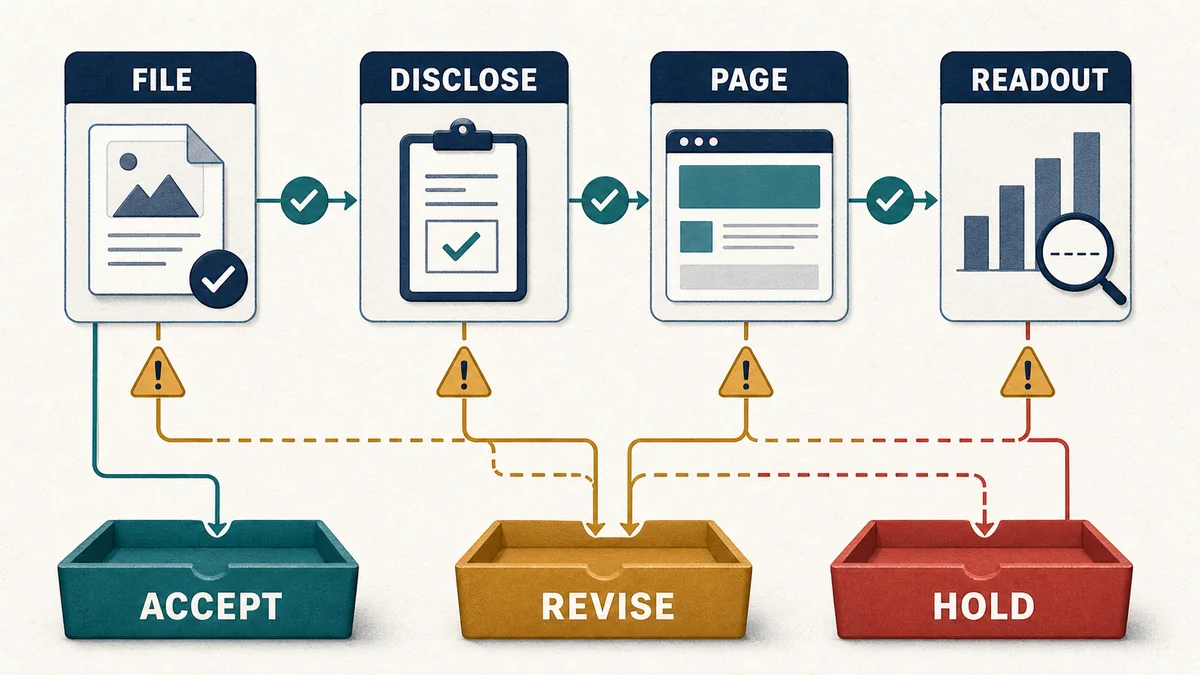
Hold, revise, accept
Use a simple decision ladder so creative review does not turn into subjective taste or a hidden campaign rejection.
| Status | Use when | Next action |
|---|---|---|
| Accept | Assets, disclosure, destination, tracking, and reader fit are complete enough to traffic and report. | Record the approval date, active version, and launch owner. |
| Accept with limitation | The campaign can run, but a field such as downstream lead status, comparison rule, or landing-page version is unavailable. | State the reporting limitation before launch and keep conclusions descriptive. |
| Revise | The campaign fit is plausible, but a file, message, destination, disclosure, or tracking field needs correction. | Return a specific asset list and do not change the flight date until the new version is approved. |
| Hold | The asset is broken, unclear, mismatched to the destination, difficult to disclose, or impossible to report cleanly. | Pause trafficking until the buyer supplies a corrected packet. |
Decision pressure table
Most mistakes happen when the team treats every missing field the same way. A missing backup image may be a revision item. A destination that does not match the offer is a hold. A missing causal comparison does not always block launch, but it changes what the report is allowed to say.
| Pressure point | If the record is clean | If the record is incomplete | Acceptance decision |
|---|---|---|---|
| File and format | All required sizes, backups, weights, and version IDs match the placement plan. | One size is missing, an animation lacks fallback, or a version is unclear. | Revise unless the missing unit is removed from the media plan. |
| Reader and context fit | The message names a resource, decision help, event, tool, or offer that belongs in the selected context. | The creative is vague, sensational, or disconnected from the page where it will run. | Revise the message or move the placement scope. |
| Destination match | The landing page headline, offer, brand, form, and mobile route match the creative promise. | The click leads to a generic page, unexpected gate, broken mobile route, or different offer. | Hold until the destination is corrected. |
| Tracking trail | Creative ID, placement ID, destination ID, UTM values, and campaign ID survive redirects. | The campaign can serve, but results cannot be tied back to the right asset or context. | Revise before launch if the report must compare assets. |
| Outcome claim | The readout claim is matched to the design: descriptive, comparative, or causal. | The buyer expects lift language but no holdout, rotation, prior baseline, or quality signal exists. | Accept with limitation or hold the claim, not the traffic. |

Launch handoff script
- Which campaign, package, placement, creative, and destination IDs are final?
- Which supplied files map to each eligible display or native placement?
- Does every click URL reach the expected landing page on desktop and mobile?
- Which fields will identify creative, context, device, and destination in the readout?
- Which landing-page or buyer-side quality signals are available after the flight?
- What is the strongest claim the readout is allowed to make if no designed comparison exists?
Pair with
Use this checklist after the contextual campaign brief defines the reader job and before the campaign tagging QA checklist verifies URL parameters and IDs. Pair it with the media kit and ad inventory readiness matrix for accepted placement sizes, the landing page launch QA worksheet for destination speed, form, source-field, and routing checks, the campaign data-layer spec for source-trail fields, the landing page and lead quality checklist for downstream quality, the creative testing readout checklist after results arrive, and the creative and destination troubleshooting matrix when response needs to be diagnosed across message, page, routing, and comparison design.