Buyer readiness
Campaign readiness dashboard
Organization byline: Measurement Press editorial desk. This page does not list an individual author or reviewer. Read the editorial method and corrections policy.
About 11 min read
Use this dashboard when a contextual, private marketplace, or direct campaign is almost ready to launch but the team still needs one shared view of package proof, creative approval, destination QA, inventory contracts, reporting fields, and readout limits.
A campaign can be attractive and still be unready. The dashboard separates the parts that need commercial agreement, ad operations, buyer handoff, and measurement judgment so the launch decision is not hidden inside a campaign name or a loose email thread.

Launch packet snapshot
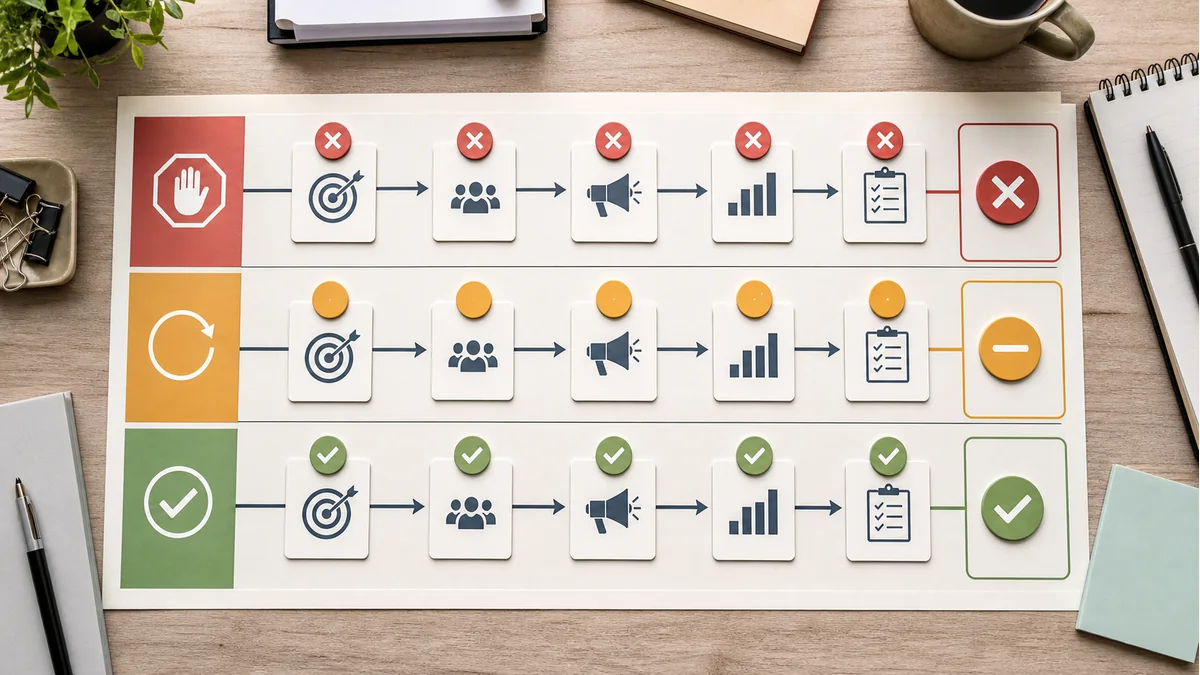
Before the worksheet becomes an approval record, name the five records that decide whether this campaign is ready, needs revision, or should stay on hold.
Commercial scope is fixed
Buyer objective, package ID, eligible context, exclusions, format mix, and package owner are visible before launch work starts.
Trafficable record is visible
Placement IDs, accepted sizes, device rules, refresh expectations, report keys, and seller-path checks match the package.
Offer and destination are approved
Display or native files, click URL, backup assets, landing-page QA, source capture, and routing have an approval trail.
Readout language is bounded
Primary signal, comparison rule, buyer-side fields, closeout timing, and strongest allowed claim are named before data arrives.
Open fixes have owners
Required fixes, launch ticket, approval status, next owner, and review date are attached to any revise or hold decision.
The first pass is a triage, not a score. A red item means the campaign should stay on hold when the missing record changes what was bought, what can be served, or what the report can fairly claim. A yellow item means the campaign can move only after a named owner proves the fix.
Build the launch packet
The dashboard is most useful when it produces a small packet that can survive handoffs between sales, ad operations, analytics, and the buyer. Save the fields that changed the launch decision, not every draft note. The final packet should make three things clear: what was bought, what can be trafficked, and what the first readout is allowed to say.

| Packet item | What to attach | Launch risk it controls |
|---|---|---|
| Commercial scope | Buyer objective, package ID, eligible page set, exclusions, and promised format mix. | Prevents a broad campaign name from hiding a narrower delivery contract. |
| Inventory contract | Placement IDs, accepted sizes, device rules, refresh expectations, and report keys. | Prevents trafficking against inventory that differs from the buyer-facing plan. |
| Creative and destination proof | Approved files, click URL, backup assets, landing-page QA, form path, and source capture. | Prevents avoidable underperformance from broken or mismatched handoffs. |
| Measurement boundary | Primary signal, comparison rule, buyer-side fields, data close date, and strongest allowed claim. | Prevents descriptive delivery from being rewritten as causal lift after launch. |
| Owner record | Named owner, required fixes, approval ticket, and next review date. | Prevents a revise decision from becoming an unowned launch delay. |
Escalate before launch when
01
The package changed. Reopen the intake worksheet if the buyer objective, eligible context, exclusions, format mix, or pricing basis changed after the original proposal.
02
The destination changed. Recheck page speed, message match, source capture, consent language, and lead routing before paid traffic starts.
03
The report language changed. Rebuild the measurement boundary if a descriptive campaign is now expected to support lift, incrementality, or quality claims.
04
The owner is unclear. Hold the launch decision when a required fix has no owner, due date, approval record, or buyer-side dependency deadline.
How to read the dashboard
A ready campaign has a stable package, a trafficable placement contract, approved creative, a working destination, and report fields that match the claim the buyer expects to make. A revise decision is useful only when the fix is small, owned, and visible in the approval record. A hold decision protects the buyer and publisher when the missing item would change what was bought, what can be served, or what the report can fairly say.

Worked example: revise instead of launch
Suppose a buyer has approved a contextual package and creative files, but the landing page was changed the morning before launch. The team can still use the dashboard without turning the meeting into a long debate: separate the stable records from the changed record, then decide whether the change alters the buyer promise or only needs a bounded fix.
| Dashboard signal | Decision | Reason | Owner before traffic starts |
|---|---|---|---|
| Package proof and eligible page set are unchanged. | Ready | The buyer-facing scope still matches the proposal and deal key. | Sales owner keeps the approved package record attached. |
| Creative files, labels, and backup sizes are approved. | Ready | The units can be trafficked without changing the public sponsorship presentation. | Ad operations attaches final files and active dates. |
| Landing page changed after QA. | Revise | The destination may still be acceptable, but speed, message match, form path, source fields, and consent need a fresh check. | Marketing owner reruns destination QA and adds the result to the launch ticket. |
| Readout language depends on buyer-side leads. | Revise | The source field must survive the new form path before the report can describe lead quality. | Analytics owner confirms captured fields before the campaign starts. |
| No owner can confirm the changed destination. | Hold | A missing owner turns a small revise item into an unbounded launch risk. | Publisher lead holds launch until the approval record is complete. |
Evidence-backed readiness gate
The dashboard is a launch control, not a quality score that can be averaged into approval. Treat the destination, tracking, and measurement records as evidence gates: a packet can be mostly complete and still need revision when one missing record changes what a person will experience or what the report can claim.
Simulated worked gate — not a live campaign audit
Assume six required checks are reviewed for one hypothetical launch packet. Commercial scope, inventory contract, creative approval, measurement setup, and owner record pass; destination QA is not yet complete. Packet completeness is 5 ÷ 6 = 83.3%. The decision is still Revise, not Ready, because the destination is a launch-blocking check rather than a soft point deduction.
That boundary follows Google's Destination requirements: an ad destination should work on common browsers and devices, be crawlable, match the ad's destination, and offer useful original content. The arithmetic is only a reproducible packet-completeness check; it does not establish campaign performance, policy approval, or causal lift. Change the result if the destination QA record, scope, tracking fields, or measurement design changes.
| Evidence check | Simulated state | What must be attached |
|---|---|---|
| Commercial scope | Pass | Buyer objective, eligible page set, exclusions, package ID, and owner. |
| Inventory contract | Pass | Placement IDs, accepted sizes, device rules, refresh expectations, and report keys. |
| Creative approval | Pass | Final files, labels, click URL, active dates, backup sizes, and approval record. |
| Destination QA | Revise | Working page, message match, crawlability, form path, consent, source capture, and routing. |
| Measurement setup | Pass | Primary signal, comparison rule, data close date, and strongest allowed claim. |
| Owner record | Pass | Named responsibility, due date, launch ticket, and approval status. |
How the decision changes - simulated packet logic
Reproduce the example by assigning one point to each of the six evidence rows above, then dividing passed rows by six. The simulated packet is 5 / 6 = 83.3%, but the missing destination check remains a Revise decision because it changes the post-click experience. If destination QA passes without changing scope, inventory, creative, measurement, or ownership, the same packet becomes 6 / 6 = 100%; that is a readiness result, not proof of delivery, conversion lift, or policy approval.
If the destination change breaks message match, consent, source capture, routing, or crawlability, stop treating it as a point to recover and move the packet to Hold. If the buyer asks for an incremental or causal conclusion, attach a separate experiment or lift design: Google's Experiments guidance describes comparing an original and trial campaign over a specified period, while Conversion Lift guidance describes study power, holdout, budget, duration, and conversion-lag considerations. Those designs answer a different question from launch readiness.
Source and measurement boundaries
Use a consistent campaign identifier and source, medium, and campaign parameters when a destination must be tied back to a traffic source. Google's Analytics URL-builder guidance explains that those values appear in acquisition reporting and that inconsistent naming can fragment the report. For a controlled test, Google's Experiments guidance describes comparing a trial campaign with the original over a specified period; its Conversion Lift setup guidance separately describes study power as depending on historical data, estimated lift, budget, duration, and holdback. These official definitions were re-read for this source trail. They help define a launch packet and its measurement handoff, but they do not turn a tracking-complete or descriptive packet into a causal claim.
Choose the next readiness check.
Use these routes when the dashboard exposes a missing buyer, package, inventory, creative, destination, or readout field.
Audience fitConfirm reader intentCheck whether the offer belongs with the reader job before the package is priced.
IntakeRebuild the proposal recordLock objective, package lane, creative handoff, floor inputs, and readout boundary.
InventoryCheck placement contractsMatch placement IDs, sizes, device classes, refresh rules, and reporting keys.
CreativeApprove assets before trafficVerify file specs, claims, labels, active dates, backup sizes, and click paths.
DestinationTest the post-click pathConfirm page speed, message match, form path, consent, source fields, and routing.
ReadoutPreserve the claim boundarySeparate delivery, response, comparison strength, and next action before renewal language.
Pair with
Start with the audience intent map, media kit, private marketplace buying terms guide, and advertiser intake worksheet. Then attach the contextual package proof sheet, private marketplace package brief template, private marketplace deal review checklist, inventory readiness matrix, creative asset acceptance checklist, landing-page QA worksheet, reporting field dictionary, campaign readout QA checklist, and creative and destination troubleshooting matrix before the final report becomes a renewal or retest decision.